
Lab project folders
 
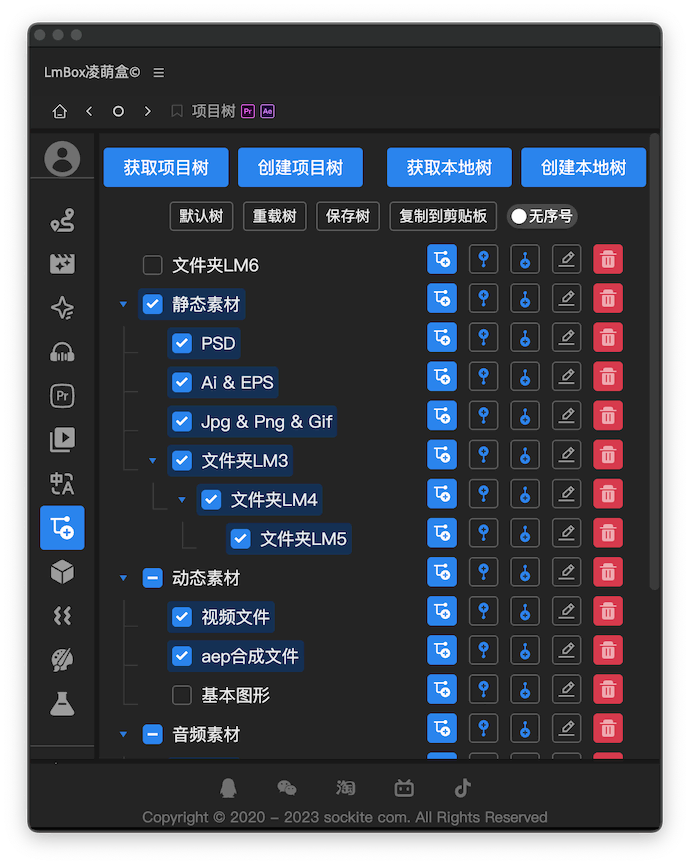

Overview
Create the folder structure of a project quickly. You can create folders, build hierarchies, read the structure of the current project, drag items, auto-number and more. It is already used by two tools: the Pr toolkit and the Ae toolkit.
Video demo
Features
Get project treereads the folder structure of the current project and shows it in the panel.Create project treecreates the activated folders in the Project panel following the structure. Folders that already exist are skipped, and missing ones are added.Get local treereads the folder structure of a path on your disk and shows it in the panel.Create local treecreates the activated folders at the local path you choose. Folders that already exist are skipped, and missing ones are added.Default treeloads the default preset project tree of the extensionReload treeloads the project tree you saved earlier (if any)Save treesaves the current folder hierarchy and activation state locally, so the Pr toolkit project tree and the Ae toolkit project tree can use itNumberingswitches whether folders are ordered by number. With numbers on, the prefix is calculated for you.Tree structuremanages the hierarchy and activation state, and supports adding, deleting, renaming, drag-and-drop sorting and more.Copy to clipboardcopies the activated tree to the clipboard with its hierarchy, handy for notes and annotations later. For example:
md
◎
├─ Project tree
│  ├─ Static assets
│  │  ├─ PSD
│  │  ├─ Ai & EPS
│  │  └─ Jpg & Png & Gif
│  ├─ Motion assets
│  │  ├─ Video files
│  │  ├─ Aep composition files
│  │  └─ Motion graphics
│  ├─ Audio assets
│  │  ├─ Sound effects
│  │  ├─ Music
│  │  └─ Sound effects to process
│  ├─ Sequences & compositions
│  └─ Other
Release notes
2.4.2Save and manage folder structures in the preset library on the right. When reading from your computer, folders that are too deep or too many are imported only in part, with a notice, so the app does not freeze.