
LmBox Bridge Core (desktop app)


Using the older plug-in
This page is about LmBox Bridge Core in the desktop app. If you still use the older plug-in inside the Pr / Ae / DaVinci Resolve extension panel (browse drafts, drag or double-click to import single items), see the older "LmBox Bridge Core (editing extension)" guide. It has not been translated into English (Chinese only).
Overview
Jianying is the China edition of CapCut, and BiJian is the editing app from Bilibili. LmBox Bridge Core reads the local drafts of both.
In the desktop app, open LmBox Bridge Core in the left sidebar, then Draft import. It lists the local Jianying and BiJian drafts together. Pick one and use Pulse import or XML import to bring it into the connected editing extension (the exact range depends on the interface of your current version).
If you can finish and deliver in Jianying, do it there. Moving a project to another editing app brings ecosystem differences, so the result may not match what you saw in Jianying.
Video tutorial
Public class demo (install, draft sync, pulse / XML, log pack, color conform): Open on Bilibili
Install and prepare
- Download the desktop app: get the LmBox Bridge desktop app for your system from the install guide. Do not download the discontinued older "plug-in" installers.
- Install the editing extension: close Premiere Pro, After Effects and DaVinci Resolve first. In the desktop app's Plug-in manager, install the Adobe extension and the DaVinci Resolve extension (see Plug-in manager). Restart the editing app afterwards. If the sidebar icon in DaVinci Resolve is not lit, go to Workspace → Workflow Integrations → LmBox Bridge and click it once (no extra window appears, it just connects).
- External tools & media: → → Download & install (or configure FFmpeg / FFprobe yourself). Waveforms and import features depend on this.
Set up the transcode tools before first use
See the "Set up external tools" section in the desktop install guide.
How to open it
In the desktop app, expand LmBox Bridge Core in the left sidebar and open Draft import. You do not have to open "Lab" first, as you do inside an extension.
When the target extension icon (Pr / Ae / DaVinci Resolve and so on) at the top of the sidebar is lit, it is connected to that editing extension. Imports go to the currently selected target app.
Draft sync and status colors
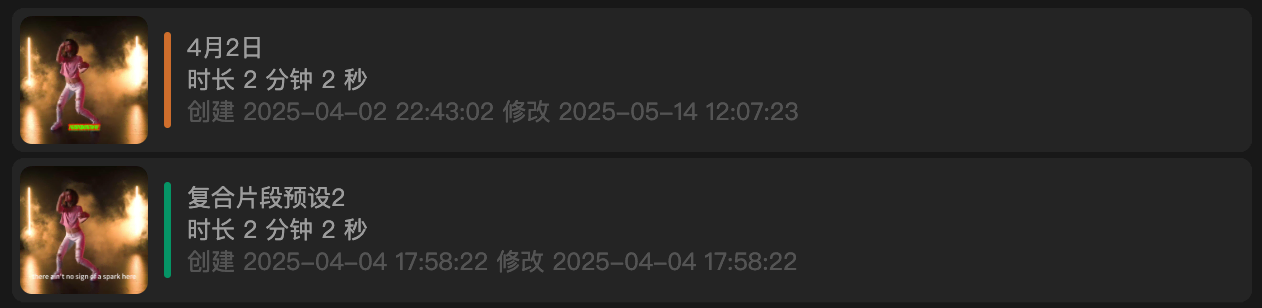
| Color | Meaning |
|---|---|
| Orange | A draft from a newer Jianying version. Handle it with the "Newer Jianying drafts" steps below first |
| Green | A preset (or a draft that already opens normally) |
| Pink | A BiJian draft |
After you select a draft you can preview the timeline, subtitles, text-to-speech, stickers, sound effects and so on. To keep nested compounds, tick Main timeline and then import. In Premiere Pro / DaVinci Resolve you can double-click on the main track to enter the child timeline. If you tick only one compound, only that one is imported.
Notes before you use it
Note
This feature is not part of a membership plan. We cannot guarantee it covers what you expect, and non-members do not get one-to-one technical support. Use this page and work it out yourself.
Drafts built from templates are not supported!
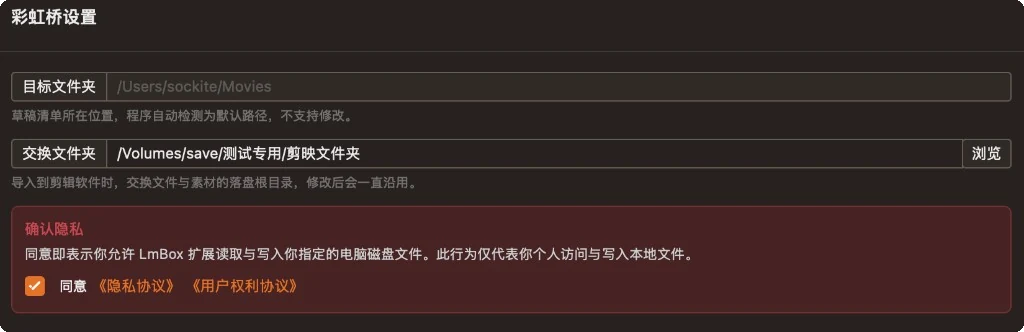
LmBox Bridge Core needs to read and write the local disk locations you choose, so tick the privacy confirmation before you use it.
Exchange folder
After opening , click to open LmBox Bridge Core settings:
| Item | Description |
|---|---|
| Project folder | Where the draft list is stored. It is detected automatically and cannot be changed |
| Exchange folder | The root folder where exchange files and media are written when you import into the editing app. Click Browse to choose it, and it is remembered |
| Privacy confirmation | Tick it to allow reading and writing the local disk locations you choose |
The exchange files and side media created by pulse import and XML import are all written under the exchange folder. If you change drives or the path stops working, come back here and browse again.
Pulse import and XML import
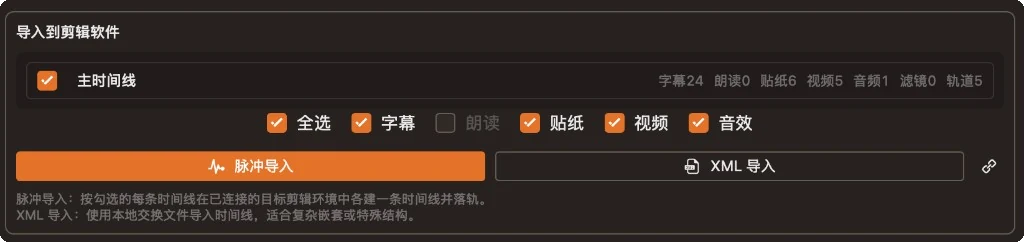
On the Draft import page, tick the timelines and the subtitles / stickers / video / sound effects you want, then use the buttons below to bring them in as a batch. (Inside the extension you can still drag or double-click single items, see the older extension guide.)
| Method | Description |
|---|---|
| For each ticked timeline, builds one timeline in the connected target app and lays down the tracks. Works in Pr, Ae and DaVinci Resolve | |
| Writes an exchange file and imports the whole package. Works in Pr, DaVinci Resolve and Final Cut. Not supported in Ae (the button is gray) |
- Final Cut supports XML only. After the import, click Open local folder and double-click the exchange file to finish.
- You can also double-click a timeline row to import quickly.
- Nested compounds in a Jianying draft: after you tick the main timeline,
Pulse import/XML importinto Premiere Pro or DaVinci Resolve places them where they were on the main track, and you can double-click to enter. If you tick only one compound, only that one is imported. - Multicam Jianying drafts: after import, the program track keeps only the angle that was on screen and the sound that was on. It does not build one more timeline for every multicam clip.
- If an import goes wrong: untick subtitles, text-to-speech or some of the audio and try again. Do not tick everything at once.
Log pack (desktop app)
The log pack exists only in LmBox Bridge Core on the desktop. Every time a Pulse import or XML import ends (successful or not), an Open log pack button appears at the bottom of the page so you can look at the record of that import.

Figure: After an import, click Open log pack. The prompt says the pack contains no finished videos or media.
| Item | Description |
|---|---|
| When it appears | After a pulse / XML import has finished |
| What is inside | Stage records and troubleshooting information of this import (small, usually tens of KB) |
| What is not inside | It does not contain your finished videos, project media or the Jianying draft itself, so it is safe to send |
| How to use it | When an import looks wrong, click Open log pack, find the file, and send it to us through a ticket or in the comments for analysis |
TIP
The older plug-in inside editing extensions has no log pack entry. To troubleshoot an import, run it once more with LmBox Bridge Core in the desktop app, then send the log pack.
Before you start: make sure the target extension icon in the sidebar is lit, the exchange folder is set, and FFmpeg / FFprobe are configured.
Newer Jianying drafts
When you are told the draft is on a version higher than 6.0 or similar:
- On the Jianying timeline, select one segment (not too many) and unpack the compound clip
- Right-click and Save as preset, then wait until it finishes
- Go back to Draft import in the desktop app and click Refresh. Import after a green preset item shows up
Color conform from DaVinci Resolve
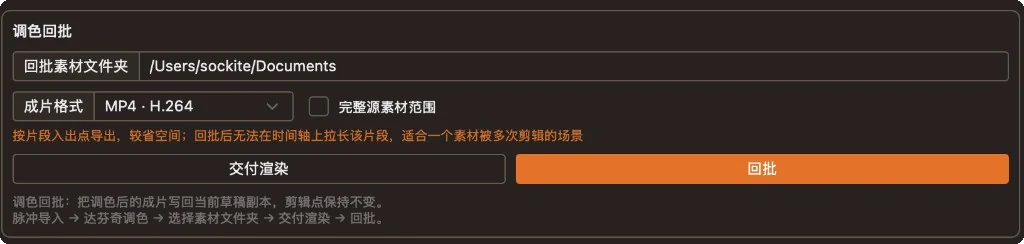
After you pulse import a Jianying draft into DaVinci Resolve and grade it, Color conform writes the graded clips back into a copy of the Jianying draft, with the cuts unchanged.
| Control | What it does |
|---|---|
| Conform media folder | The one folder used both for exported clips and for reading them back |
| Output format | For example MP4 · H.264, MOV · H.264 |
| Full source duration | Off: exports by clip In/Out points. On: exports the whole source, which takes more space |
| Deliver render | Exports the current DaVinci Resolve timeline into the chosen folder |
| Conform | Matches clips by the same name and creates a "(original name) conform" draft copy |
Suggested steps: Pulse import → grade in DaVinci Resolve → choose the conform media folder → Deliver render → Conform. Then look for the conform copy in the Jianying draft list. The original project is not overwritten.
FAQ
An import failed or media is missing. What should I do?
- Import one draft at a time. To keep nested compounds, tick Main timeline. Do not tick several unrelated timelines together
- Untick subtitles, text-to-speech and sound effects and try again
- Still failing: click Open log pack at the bottom and send us the pack (it has no finished videos or media, see Log pack (desktop app) above)
I cannot find the new draft after DaVinci Resolve color conform.
Conform creates a "(original name) conform" copy and does not overwrite the original project. Look for it in the Jianying draft list by name or by modified time. If you are told no matching clips were found, check that the conform media folder holds the files exported by Deliver render, and that the file names match the clips on the timeline.
Are the old files still there after I change the exchange folder?
Changing the path only affects exchange files and media written afterwards. Please manage the files in the old folder yourself.
Why does Save as preset not show a green draft?
The preset path must match the preset path in Jianying's global settings. For the refresh steps inside the extension, see the older extension guide (Chinese only).
Are transitions, beauty filters, filters and decorative text templates supported?
No. The migration keeps mainly the cuts and the basic track layers. Jianying effects cannot be reproduced as they are in Pr / DaVinci Resolve.
How much does it cost? Is it free?
It is free to use. It is not part of a membership plan, and non-members do not get one-to-one technical support, so please use the docs and the video to work it out yourself.
Related guides
- LmBox Bridge Core (editing extension): the draft list inside the extension and drag / double-click import (extension guide, Chinese only, not translated)
- Split view: multi-window layouts at once in DaVinci Resolve and Premiere Pro. Blog post
- Shot scout: find shots by description, grab frames, similar picks. Blog post
- Demo video on Bilibili (desktop app)
- Demo video on Bilibili (extension)
Release notes
2.4.0When a Jianying draft with nested compounds is imported into Premiere Pro or DaVinci Resolve, the main timeline now keeps child timelines you can double-click to enter.2.4.0After a Jianying multicam draft is imported, the timeline gets only the current angle and the sound that was on, instead of many nested clips.2.4.0Fixed pulse import and XML import forcing picture and sound to link together and drift apart. Video with its own sound still links normally.2.4.0Fixed the left and right channels being split into two mono tracks when importing video with sound. It now lands as one stereo track.2.3.1Fixed color conform not matching the finished clips for some Jianying drafts after DaVinci Resolve grading. They can now be written back to a copy.2.3.1Fixed some Jianying drafts importing by XML with sound but no picture on the timeline. The picture now comes in too.2.3.1Fixed the picture size and frame rate being wrong when a Jianying combined preset is pulse imported into DaVinci Resolve. The timeline now follows the real picture in the preset.2.3.0Fixed the project list not refreshing after Jianying saved a draft while auto refresh was on. It now follows updates normally.2026-08The desktop guide was aligned with the public class BV1AxhK6BEJ8. The older plug-in usage moved to the older "LmBox Bridge Core (editing extension)" guide.2.1.4Fixed the original sound split out of a video being imported twice when importing a Jianying draft. Only one is kept now.2.1.4After an import you can open the log pack and send it to us for troubleshooting and compatibility.1.9.3Fixed the video list being empty when opening some Jianying drafts. Videos are now parsed normally.1.8.0Added pack draft media to the top bar: with a Jianying or BiJian draft selected, you can collect the pictures, videos and audio you imported by hand into a folder you choose.1.5.0You can set a custom exchange folder in the settings. Import and export files are saved where you say.0.3.0Added DaVinci Resolve color conform: choose the output folder and write back to a Jianying copy, with the timeline cuts unchanged.0.2.9Fixed clips being offset on the timeline, or their In/Out points off, after a draft pulse import. It now matches the Jianying draft.0.2.2With the After Effects extension connected, a Jianying draft can be imported into the current project in one click, with video, audio, stickers and subtitles placed on layers by timeline.0.2.0With a Premiere Pro or DaVinci Resolve editing extension connected, the timeline side supports both pulse import and XML import.