
Lab Translate & replace
 
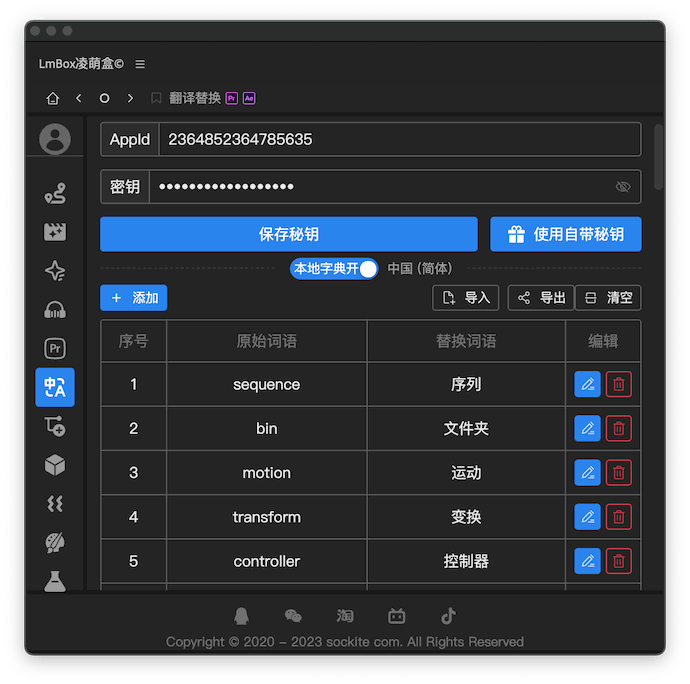

Overview
This is a shared Lab tool. It manages the translation API and your local dictionary, and supplies them to other tools. Today it powers two of them: Translate & replace in the Pr toolkit and Translate & replace in the Ae toolkit. The tool was built for Chinese-speaking editors, so it translates names such as sequences, layers, effects and audio into Chinese.
How to use
App ID and keyEnter the App ID and key of your Baidu Translate API account. You can register for one yourself, and it comes with a free monthly quota. See how to apply for a Baidu Translate API key.Save keySaves the App ID and key you entered on your computer.Use the built-in keyA member feature: use the App ID and key we provide instead of applying for your own.AddAdds a single new term to your local dictionary.ImportImports a dictionary you backed up earlier (if any) or one someone shared with you. For your first use, we strongly recommend importing my prepared dictionary of professional terms (hosted on Lanzou, a Chinese file-sharing site).ExportExports the current dictionary to share or back up.ClearDeletes the whole current dictionary. Note that this clears everything.Dictionary tableManage and delete entries in your local dictionary.
Apply for a Baidu Translate API key
Tip
You sign in with a Baidu account. Any account linked to Baidu services, such as Baidu Netdisk or Tieba, works.
- Register and sign in on the Baidu Translate Open Platform (Chinese site).
- If this is your first time on the platform, register as a developer and verify your identity. Reference steps
- Turn on the general translation API. Reference steps
- Copy your App ID and key.